
1.VMware安装
https://mp.weixin.qq.com/s/MExyhukU8mr-mTumBQ5nYA
2.windows镜像网站
系统库:https://www.xitongku.com/index.html
系统之家:https://www.xitongzhijia.com.cn/
win10镜像文件(https://blog.csdn.net/heike_Ch/article/details/140047605)
3.系统激活KMS工具
https://benson88.lanzn.com/ioVZb1p41dlg
4.VMTools下载
https://packages.vmware.com/tools/esx/latest/windows/x64/
5.谷歌浏览器
6.解压软件
7.windows延缓更新
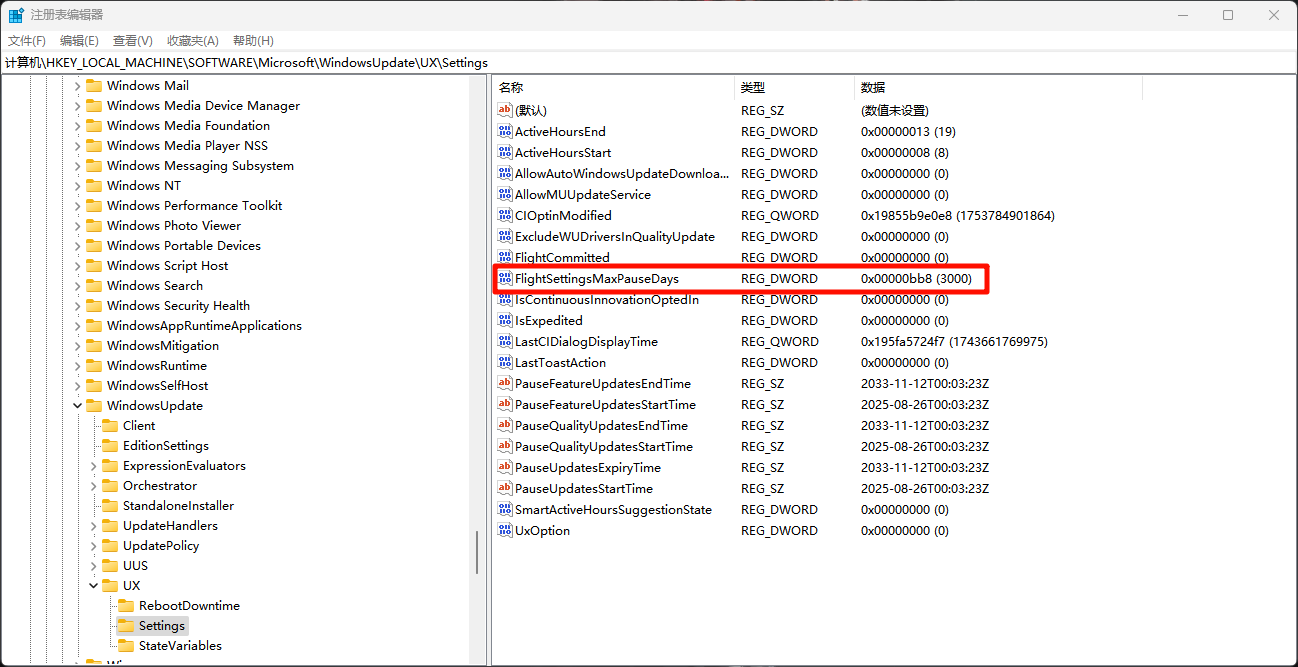
计算机\HKEY_LOCAL_MACHINE\SOFTWARE\Microsoft\WindowsUpdate\UX\Settings
FlightSettingsMaxPauseDays